
How do I install Wait.li on my theme?
Wait.li shows your waitlist on the product page. On most themes you add the Wait.li block in the theme editor, with no code. Older themes need a short code edit.
Installation is the same on every Wait.li plan. Want us to do it for you? Email help@wait.li and we'll install it.
Turn on customer accounts
Shoppers need a customer account to join a waitlist, so accounts must be on in your store.
- In Shopify admin, go to Settings > Customer accounts.
- Set accounts to required or optional. See Shopify's guide to customer accounts.
Then check which version of customer accounts your store uses:
- Classic customer accounts (shoppers sign in with a password): the Wait.li block works as it is. Shoppers join with their email and a password.
- New customer accounts (shoppers sign in with a one-time code): the standard Wait.li form can't sign shoppers in. Install with code and use the version of the Wait.li snippet for new customer accounts. See "Use Wait.li with new customer accounts" below.
Add the Wait.li block (Online Store 2.0 themes)
Use this on Dawn and most themes released since September 2021.
-
In Shopify admin, go to Online Store > Themes.
-
Click Customize next to your theme. To install on a copy of your theme first, click Customize next to that copy instead.

-
Open your product template from the menu at the top of the editor.
-
In the left sidebar, click Add block in the product section.
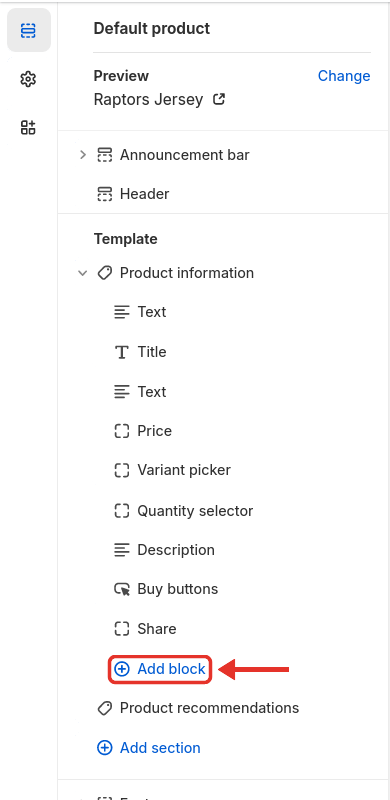
-
Under App blocks, pick Wait.li Waiting List.
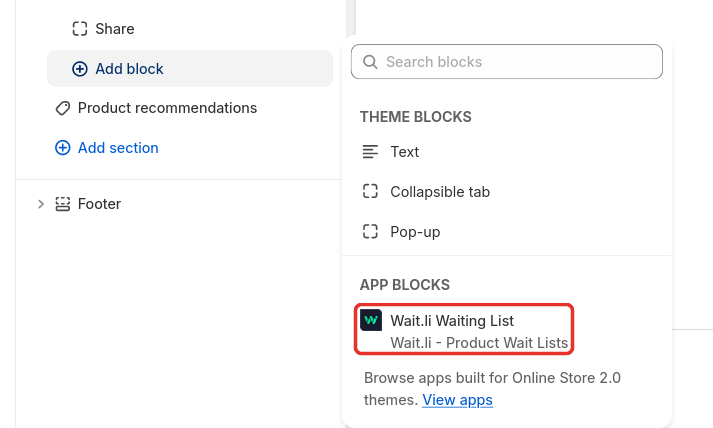
-
Drag the block to where you want the waitlist. Most stores put it below the product title and price.
-
Click Save.
If the product you're previewing has an active waitlist, you see it on the page. If not, the page shows nothing, but Wait.li Waiting List is listed in the sidebar.

Wait.li opens the theme editor for you during setup too: click Open Theme Editor in the app.
If shoppers can still buy the product
While a waitlist is active, Wait.li hides your add to cart button from shoppers who aren't activated yet. On some themes the button stays visible. To fix it, wrap the buy buttons in Wait.li code:
- In Shopify admin, go to Online Store > Themes.
- Click ... next to your theme, then Edit code.
- Open your product section, for example main-product.liquid.
- Paste this code near the top of the file:
{% comment %} Wait.li Config Snippet (Required) {% endcomment %}
{% capture 'wait_li_capture' %}{% render 'wait_li_config', product: product %}{% endcapture %}{%- assign wait_li_capture_results = wait_li_capture | split: '|' -%}{%- assign wait_li_active = wait_li_capture_results[0] | strip -%}{%- assign show_waiting_snippet = wait_li_capture_results[1] | strip -%}{%- assign is_customer = wait_li_capture_results[2] | strip -%}{%- assign customer_status = wait_li_capture_results[3] | strip -%}
{% comment %} End Wait.li Config Snippet (Required) {% endcomment %}
- Paste the first part of this code just above the add to cart button and quantity selector, and the last part just below them. Leave the price, photos and description outside it.
{% comment %} Wait.li Hide Code 1/2 {% endcomment %}
{% if wait_li_active == 'false' or show_waiting_snippet == 'false' %}
{% comment %} End Wait.li Hide Code 1/2 {% endcomment %}

// Product Form Element Area, for example:
<div class="quantity_selector_element"></div>
// end of existing product form element

{% comment %} Wait.li Hide Code 2/2 {% endcomment %}{% endif %}
{% comment %} End Wait.li Hide Code 2/2 {% endcomment %}
- Click Save, then open a product page with an active waitlist to check it.
This code needs the Wait.li snippets on your theme. See step 1 of "Install with code" below.
Install with code (older themes)
Use this on themes that don't support app blocks, or if your store uses new customer accounts.
- Make sure the Wait.li snippets are on your theme. Open Wait.li and click App Settings. Under Re-Install Wait.li Snippets, pick your theme and click Re-Install Wait.li Snippets. To add them by hand, see Manual Snippet Installation.
- In Shopify admin, go to Online Store > Themes.
- Click ... next to your theme, then Edit code.
- Under Snippets, check that wait_li_config.liquid and wait_li_button.liquid are there.
- Open your product template. On most older themes it's product-template.liquid in Sections, or product.liquid.
- Find the product form. Search the file for
form 'product'. It looks like this:
{% form 'product', product, id:form_id %}
  // Add to cart code
{% endform %}
- Paste this code just above the product form:
{% comment %} Wait.li Button 1/4 {% endcomment %}{% capture 'wait_li_capture' %}{% render 'wait_li_config', product: product %}{% endcapture %}{%- assign wait_li_capture_results = wait_li_capture | split: '|' -%}{%- assign wait_li_active = wait_li_capture_results[0] | strip -%}{%- assign show_waiting_snippet = wait_li_capture_results[1] | strip -%}{%- assign is_customer = wait_li_capture_results[2] | strip -%}{%- assign customer_status = wait_li_capture_results[3] | strip -%}{% if wait_li_active == 'true' and show_waiting_snippet == 'true' %}{% render 'wait_li_button', product: product, is_customer: is_customer, customer_status: customer_status %}{% else %}{% comment %} Wait.li Button 2/4 {% endcomment %}
- Paste this code just below the end of the product form:
{% comment %} Wait.li Button 3/4 {% endcomment %}{% endif %}{% comment %} Wait.li End 4/4 {% endcomment %}
- Click Save.
- Open a product page and check that it loads without errors.
Use Wait.li with new customer accounts
With Shopify's new customer accounts, shoppers sign in with a one-time code, not a password. Wait.li needs a different snippet for this. Signed-out shoppers click the join button, sign in through Shopify, and join the list when they land back on the product page.
- Install Wait.li with code. See "Install with code" above.
- In the code editor, open Snippets > wait_li_button.liquid.
- Replace everything in the file with the code below.
- Click Save.
Re-Install Wait.li Snippets in the app replaces this file. If you reinstall the snippets, paste this code again.
{%- liquid
  ############################################
  # 1.DATA PREP
  ############################################
  assign variant = product.selected_or_first_available_variant

  # Product‑level metafield (FIXED - use original logic)
  assign og_wait_li_product_id = product.id | downcase
  assign og_wait_li_product_metafield = product.metafields.wait_li[og_wait_li_product_id]
  assign new_wait_li_product_id = variant.id | downcase
  assign new_wait_li_product_metafield = variant.metafields.wait_li[new_wait_li_product_id]

  if og_wait_li_product_metafield
    assign wl_product_metafield = og_wait_li_product_metafield
    assign wl_product_id = og_wait_li_product_id
  else
    assign wl_product_metafield = new_wait_li_product_metafield
    assign wl_product_id = new_wait_li_product_id
  endif

  # Customer status check (FIXED - this was missing)
  assign wl_customer_metafield = customer.metafields.wait_li[wl_product_id]
  assign customer_status = wl_customer_metafield.customer_status

  assign wl_settings = shop.metafields.wait_li.settings
  assign list_count = wl_product_metafield.list_count | default: 0
  assign list_limit = wl_product_metafield.wl_list_limit | plus: 0
  assign spots_left = list_limit | minus: list_count

  #  Strings (fallbacks + quick plural helper)
  assign sign_in_raw = wl_settings.sign_in_text | default: 'There are currently list_count people on the waiting list. Click the button below to join!'
  assign sign_in_text = sign_in_raw | replace: 'list_count', list_count
  if list_count == 1
    assign sign_in_text = sign_in_text | replace: 'people', 'person' | replace: 'are', 'is'
  endif

  assign waiting_raw = wl_settings.currently_waiting_text | default: 'You are currently #current_position on the waiting list. Please keep an eye on your inbox.'
  assign waiting_text = waiting_raw | replace: 'list_count', list_count

  assign join_text = wl_settings.join_text | default: 'Join WaitList'
  assign success_raw = wl_settings.success_text | default: 'Congratulations! You are now #current_position on the waiting list. Keep an eye on your email for when you are activated!'
  assign success_text = success_raw | replace: 'list_count', list_count

  #  Colours
  assign button_colour = wl_settings.button_colour | default: '#3d85c6'
  assign button_text_colour = wl_settings.button_text_colour | default: 'white'

  #  Limit messaging
  if list_limit > 0
    assign limit_info_raw = wl_product_metafield.wl_lang_list_limit_info | default: 'There are spots_left spots left on the waiting list. Join now to get a spot!'
    assign limit_info = limit_info_raw | replace: 'spots_left', spots_left
    if spots_left == 1
      assign limit_info = limit_info | replace: 'spots', 'spot' | replace: 'are', 'is'
    endif
    assign no_spots_left = wl_product_metafield.wl_lang_no_spots_left | default: 'There are no spots left on the waiting list right now. Please wait until a spot opens up.'
  endif

  #  Referral settings
  # Language settings (FIXED - match original structure)

  assign wl_lang_join_waiting_list = wl_settings.meta_settings.register_btn_txt | default: 'Join WaitList'
  assign wl_lang_main_referral_msg = wl_settings.meta_settings.main_referral_msg | default: 'Share the link below to refer your friends and jump up spots on the waiting list!'
  assign wl_lang_custom_column = wl_settings.meta_settings.custom_column_txt
-%}

{%- capture wait_li_referral_box -%}
{% if wl_product_metafield.metaSettings.isReferral %}
  <div class="wait_li_referral_box">
    <p>{{ wl_lang_main_referral_msg }}</p>
    <textarea id="in_page_referral_box" class="wait_li_copy_field">{{ shop.url }}{{ product.url }}?ref=__referral_id__</textarea>
    <button id="in_page_copy_btn" class="wait_li_copy_button" wait_li_tooltip="Copied!">
      Copy
      <svg viewBox="0 0 20 20" xmlns="http://www.w3.org/2000/svg"><path d="M7.5 2A1.5 1.5 0 006 3.5V13a1 1 0 001 1h9.5a1.5 1.5 0 001.5-1.5v-9A1.5 1.5 0 0016.5 2h-9zm-4 4H4v10h10v.5a1.5 1.5 0 01-1.5 1.5h-9A1.5 1.5 0 012 16.5v-9A1.5 1.5 0 013.5 6z" fill="#5C5F62"/></svg>
    </button>
  </div>
{% endif %}
{%- endcapture -%}
<!-- 2 · MAIN WRAPPER -->
{% if customer %}
  {% unless customer_status == 'active' %}
    <div id="wait_li_form" class="wla_form">
      <p class="wla_text wait_li_list_status">
        {% if list_limit > 0 %}
          {{ limit_info }}
        {% endif %}
      </p>
      {% if customer_status == 'waiting' %}
        <p class="wla_text currently_waiting" style="display:none;">{{ waiting_text }}</p>
        <div class="wait_li_referral_box_wrapper" style="display:none;">{{ wait_li_referral_box }}</div>
        <div class="wait_li_spinner"></div>
      {% else %}
        {% if list_limit > 0 and spots_left < 1 %}
          <p>{{ no_spots_left }}</p>
        {% else %}
          {% if wl_lang_custom_column %}
            <div class="wla_input wla_custom_column">
              <input
                type="text"
                id="signed_in_custom_column"
                placeholder="{{ wl_lang_custom_column }}">
            </div>
          {% endif %}
          <p>{{ sign_in_text }}</p>
          <button class="wla_button" id="wl_join_button">{{ join_text }}</button>
          <div id="list-join-loading" class="wait_li_spinner"></div>
          <div class="wait_li_referral_box_wrapper" style="display:none;">{{ wait_li_referral_box }}</div>
        {% endif %}
      {% endif %}
    </div>
  {% endunless %}
{% else %}
  <!-- GUEST LINK → Shopify hosted login with return_to -->
  <div id="wait_li_form" class="wla_form">
    {% assign current_url_with_param = product.url | append: '?join_waitlist=1' %}
    <p>{{ sign_in_text }}</p>
    <a
      id="waitli_join_link"
      class="wla_button wla_join_link"
      href="/customer_authentication/login?return_to={{ current_url_with_param | url_encode }}">
      {{ wl_lang_join_waiting_list }}
    </a>
  </div>
{% endif %}

<div id="wait_li_success" style="display:none;">
  <p id="join_success_text" class="currently_waiting">{{ success_text }}</p>
</div>

<!-- 3 · STYLE -->
<style>
  :root {
    --wl-btn-bg: {{ button_colour }};
    --wl-btn-text: {{ button_text_colour }};
    --wl-btn-radius: 8px;
    --wl-spacing: 10px;
  }

  .wla_form {
    margin: var(--wl-spacing) auto;
    padding: var(--wl-spacing);
    text-align: center;
    position: relative;
    border-radius: var(--wl-btn-radius);
    background: none;
    border: none;
    max-width: 400px;
  }

  .wla_button {
    background: var(--wl-btn-bg);
    color: var(--wl-btn-text);
    padding: 10px 18px;
    min-height: 36px;
    border: none;
    border-radius: var(--wl-btn-radius);
    cursor: pointer;
    width: 100%;
    display: inline-block;
    position: relative;
    font-size: 15px;
    font-weight: 600;
    text-decoration: none;
    transition: background 0.2s
    , color 0.2s;
    box-shadow: none;
  }

  .wla_button:hover {
    color: var(--wl-btn-text);
    filter: brightness(0.95);
  }

  .wla_text {
    margin: 0 0 8px;
    font-size: 14px;
    line-height: 1.4;
    color: inherit;
    background: none;
    padding: 0;
  }

  .wla_form p {
    text-transform: initial;
    padding-bottom: 10px;
  }

  /* FIXED: Spinner for join button */
  .wla_button.spinner {
    position: relative;
  }
  .wla_button.spinner:before {
    content: '';
    position: absolute;
    top: 50%;
    left: 50%;
    width: 18px;
    height: 18px;
    margin: -9px 0 0 -9px;
    border-radius: 50%;
    border: 2px solid rgba(0, 0, 0, 0.1);
    border-top-color: var(--wl-btn-text);
    animation: wl-spin 0.6s linear infinite;
  }

  .wait_li_spinner {
    display: none;
    position: absolute;
    top: 50%;
    left: 50%;
    width: 18px;
    height: 18px;
    margin: -9px 0 0 -9px;
    border-radius: 50%;
    border: 2px solid #ccc;
    border-top-color: #333;
    animation: wl-spin 0.6s linear infinite;
  }
  @keyframes wl-spin {
    to {
      transform: rotate(360deg)
    }
  }

  /* Success message */
  #wait_li_success {
    margin: var(--wl-spacing) auto;
    padding: var(--wl-spacing);
    text-align: center;
    background: none;
    border: none;
    border-radius: var(--wl-btn-radius);
    max-width: 400px;
  }

  .currently_waiting {
    color: inherit;
    font-weight: 500;
    margin: 0;
    background: none;
  }

  /* Referral box */
  .wait_li_referral_box {
    margin-top: 10px;
    padding: 8px;
    background: none;
    border-radius: var(--wl-btn-radius);
    border: none;
  }

  .wait_li_referral_box p {
    margin: 0 0 8px;
    font-size: 13px;
    color: inherit;
    background: none;
  }

  .wait_li_copy_field {
    padding: 8px;
    background: none;
    width: 100%;
    min-height: 36px;
    text-align: center;
    overflow: hidden;
    resize: none;
    border: 1px solid #ddd;
    border-radius: 6px;
    font-size: 13px;
    margin-bottom: 6px;
    box-sizing: border-box;
    color: inherit;
  }

  .wait_li_copy_button {
    background: none;
    border: 1px solid #ddd;
    border-radius: 6px;
    padding: 6px 12px;
    font-size: 13px;
    cursor: pointer;
    transition: background 0.2s;
    display: inline-flex;
    align-items: center;
    gap: 6px;
    color: inherit;
  }

  .wait_li_copy_button:hover {
    background: #f3f3f3;
  }

  .wait_li_copy_button svg {
    width: 16px;
    height: 16px;
    flex-shrink: 0;
  }

  /* Form inputs */
  #signed_in_custom_column {
    width: 100%;
    padding: 8px 10px;
    margin: 0 0 8px;
    border: 1px solid #ddd;
    border-radius: 6px;
    font-size: 14px;
    box-sizing: border-box;
    color: inherit;
    background: none;
  }

  #signed_in_custom_column:focus {
    outline: none;
    border-color: var(--wl-btn-bg);
    box-shadow: none;
  }

  .wla_custom_column {
    width: 100%;
  }

  .wl_validation_error {
    color: #dc3545;
    font-size: 13px;
    margin-top: 5px;
    background: none;
  }
</style>

<!-- 4 · SCRIPT (modernised, same endpoints) -->
<script>
  (() => {
  /* ======================= CONFIG ======================= */
  const BASE_URL = 'https://app.wait.li';

  const productId      = {{ wl_product_id | json }};
  const customerId     = {{ customer.id | json }};
  const customerEmail  = {{ customer.email | json }};
  const productTitle   = {{ product.title | json }};
  const productHandle  = {{ product.handle | json }};
  const shopDomain     = {{ shop.permanent_domain | json }};

  const referredId = new URL(location.href).searchParams.get('ref');

  /* ======================= HELPERS ====================== */
  const $ = sel => document.querySelector(sel);
  const $$ = sel => document.querySelectorAll(sel);

  const setCookie = (k,v,min) => {
    const d = new Date(Date.now() + min*60000);
    document.cookie = `${k}=${v};expires=${d.toUTCString()};path=/`;
  };
  const getCookie = k => (`; ${document.cookie}`).split(`; ${k}=`).pop().split(';')[0] || '';

  // FIXED: Simple position fetcher - no polling needed
  const fetchPosition = (referralId) =>
    fetch(`${BASE_URL}/current_position?referralId=${referralId}`)
      .then(r=>r.json());

  const saveReferralId = id => setCookie(`waitli_customer_referral_id_${productId}`, id, 30);
  const getSavedReferralId = () => getCookie(`waitli_customer_referral_id_${productId}`);

  const show = el => el && (el.style.display='block');
  const hide = el => el && (el.style.display='none');

  const toggleSpinner = on => $$('.wait_li_spinner').forEach(el => el.style.display = on ? 'block' : 'none');

  const initReferralBox = id => {
    $$('.wait_li_referral_box_wrapper').forEach(el=>show(el));
    $$('.wait_li_copy_field').forEach(el=>el.value = el.value.replace(/__referral_id__/g, id));
    $$('.wait_li_copy_button').forEach(btn => btn.onclick = () => {
      const ta = btn.previousElementSibling; ta.select(); document.execCommand('copy');
    });
    $$('.wait_li_list_status').forEach(hide);
  };

  /* ======================= JOIN FLOW ===================== */
  $('#wl_join_button')?.addEventListener('click', async (e) => {
    // FIXED: Only allow join if customer is actually logged in
    if (!customerId || !customerEmail) {
      console.error('No customer logged in');
      return;
    }

    const btn = e.currentTarget;
    const customColumn = $('#signed_in_custom_column')?.value || null;

    btn.classList.add('spinner');
    btn.innerHTML = '';
    btn.disabled = true;

    try {
      // FIXED: Use correct parameters for backend
      const joinData = {
        shopDomain: shopDomain,
        productId: productId,
        productTitle: productTitle,
        customerEmail: customerEmail,
        referred_id: referredId,
        custom_column: customColumn,
        skipAccountInvite: true
      };

      const response = await fetch(`${BASE_URL}/list/join`, {
        method:'POST',
        headers:{'Content-Type':'application/json'},
        body:JSON.stringify(joinData)
      });

      if (response.status === 200) {
        const data = await response.json();

        if (data.referralId) {
          saveReferralId(data.referralId);
          initReferralBox(data.referralId);
        }

        // Update position display
        $$('.currently_waiting').forEach(el => {
          el.innerHTML = el.innerHTML.replace(/current_position/g, data.position);
        });

        hide($('#wait_li_form'));
        show($('#wait_li_success'));

      } else if (response.status === 409) {
        alert('You are already on the waiting list!');
      } else {
        alert('Something went wrong. Please try again.');
      }

    } catch (error) {
      console.error('Error:', error);
      alert('Something went wrong. Please try again.');
    } finally {
      btn.classList.remove('spinner');
      btn.innerHTML = '{{ join_text }}';
      btn.disabled = false;
    }
  });

  /* ======================= ON LOAD ====================== */
  // Rewrite hosted login URL with return params
  // FIXED: Set up proper login redirect URL
  // Login redirect is now handled in Liquid using /customer_authentication/login

  // Auto‑join after login
  if(new URLSearchParams(location.search).get('join_waitlist') && customerId){
    $('#wl_join_button')?.click();
  }

  // FIXED: Logged‑in waiting customer position check
  {% if customer and customer_status == 'waiting' %}
    (async () => {
      toggleSpinner(true);
      try {
        const data = await fetch(`${BASE_URL}/current_position?customerId=${customerId}&productId=${productId}&shopDomain=${shopDomain}`).then(r=>r.json());
        if(data?.position && data.referralId){
          initReferralBox(data.referralId);
          $$('.currently_waiting').forEach(el=>{
            el.innerHTML=el.innerHTML.replace(/current_position/g,data.position);
            show(el);
          });
        }
      } catch(error) {
        console.error('Error fetching position:', error);
      } finally {
        toggleSpinner(false);
      }
    })();
  {% endif %}

  // FIXED: Guest with saved referral ID
  {% unless customer %}
    const saved = getSavedReferralId();
    if(saved){
      (async () => {
        $$('.wait_li_list_status').forEach(hide);
        toggleSpinner(true);
        try {
          const posData = await fetchPosition(saved);
          if(posData?.position && posData.status==='waiting'){
            initReferralBox(posData.referralId);
            $$('.currently_waiting').forEach(el=>{
              el.innerHTML=el.innerHTML.replace(/current_position/g,posData.position);
              show(el);
            });
          } else {
            saveReferralId(''); // Clear invalid referral ID
            $$('.wait_li_list_status').forEach(show);
          }
        } catch(error) {
          console.error('Error checking saved position:', error);
          saveReferralId(''); // Clear on error
          $$('.wait_li_list_status').forEach(show);
        } finally {
          toggleSpinner(false);
        }
      })();
    }
  {% endunless %}
  })();
</script>
Still not showing?
- Why isn't the waiting list displaying on my product page?
- Waiting list popup is underneath other elements / hidden
- Does Wait.li work with my theme's quick view function?
What's next
- How do I run a product waitlist for a launch or drop?: create your first list.
- How can I change the text and colours shown on my product page?: make the waitlist match your store.
- Wait.li Uninstallation: turn off your lists before you remove the app.